Setting the Auto Head-Cleaning Timer on the X-Arc Studio: P0, P1, Cycles and Minutes, So the Printer Looks After Itself on Holidays
Published 25 October 2025
This is the reason I recommend the Studio to anyone who closes the shop for Diwali: it cleans its own head, circulates and stirs the white on a timer, and switches itself off in between. Ninety seconds on the back panel: what P0 and P1 mean, what the green and red numbers are, how to set a five-hour cycle, and how to confirm it. Set it once before you leave and come back to a printer that prints.
What the video shows
- 0:00 — Why the Studio: auto head clean, auto circulation, auto stirring; holiday mode
- 0:11 — Printer must be off; long-press Set
- 0:19 — P0 and P1: 1 = minutes, 0 = seconds, 2 = hours; set both to 1
- 0:35 — Green = how many cycles; red = timer; 1 cycle, 300 minutes
- 0:43 — Double-tap Set to change cycle and time
- 0:58 — Confirm; the printer starts cleaning
- 1:06 — Press the red button after changing settings
- 1:14 — It cleans, shuts down, wakes after 300 minutes, repeats
- 1:22 — Same method for circulation and stirring timers
Before you touch the panel
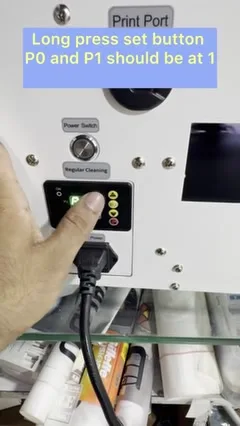
The printer has to be switched off. The timer module on the back panel has its own power, which is how it can wake the printer up later. Long-press the Set button to enter the settings.

P0 and P1: the units
Two parameters set the unit for the timer: 0 means seconds, 1 means minutes, 2 means hours. For head cleaning you want minutes, so put both P0 and P1 at 1. Double-tap Set to move between values.
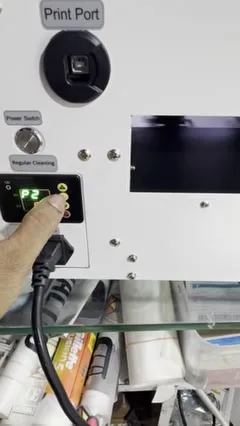
Cycles and time
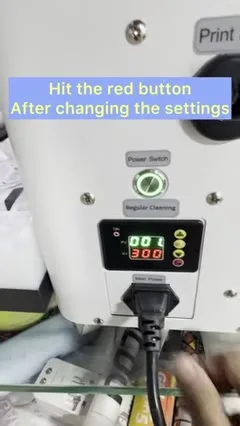
The green number is how many times the cleaning runs per wake-up; the red number is the interval. In the video: green 1, red 300. That means every 300 minutes, five hours, the printer wakes, runs one head clean, and shuts down. Double-tap Set to change either. When done, press the red button to confirm. The printer starts a clean immediately so you can see it working.

What happens on holiday
Clean, shut down, sleep five hours, wake, clean, shut down. The white stays moving and the nozzles stay open for as many days as you are away. Circulation and stirring have their own timers on the same panel and are set the same way. No PC needs to be on.

The printer
The X-Arc 600 Studio at ₹1,60,000 + GST; the full feature tour is here. If you run a converted L18050 and want the same peace of mind, the manual routine is in L18050 maintenance.
Frequently asked questions
What do P0 and P1 mean on the X-Arc Studio timer?
The time unit: 0 seconds, 1 minutes, 2 hours. Set both to 1 for a timer in minutes.
What are the green and red numbers?
Green is the number of cleaning cycles per wake-up; red is the interval in the chosen unit. 1 and 300 means one clean every five hours.
Does the PC need to stay on?
No. The timer module wakes the printer, cleans, and shuts it down on its own.
Can I set circulation and stirring the same way?
Yes, same panel, same method.
Must the printer be off to set it?
Yes. Switch off first, then long-press Set.
Timer not behaving?
Send a photo of the panel display on WhatsApp and we will read the values back to you.
WhatsApp +91 86555 56060More videos: Dedicated DTF printers (X-ARC, Yinstar)
- X-ARC XP600 Single Head DTF Printer: Every Feature Shown in the Video, Explained
- Best DTF Printer in India for Small and Large Shops: The X-ARC 600 Single Head Review
- Why the X-ARC Pro Is Different: Five Parts That Decide Whether a DTF Printer Works or Just Needs Maintenance
- Which DTF Printer Should You Buy? L18050 vs 12-Inch Dual Head, by Daily Volume
- X-Arc 600 Pro in 89 Seconds: Auto Cleaning, Anti-Collision Sensors, Capping Unit You Clean From Outside
- L1800, L8180 or a 12-Inch XP600 Dual Head? The 2022 Video on Which DTF Printer to Buy, in English