₹45,000 first installation (a year included) · ₹4,999/year after that · one licence, four PCs · Windows & Mac
For DTF print shops · Windows & Mac · version 1.0.30

Run your shop
on Delta.

DTF Powerhouse Delta is the program our own shop prints with every day: gangsheets that pack themselves, print files straight to the printer, every client and job in one place, approvals and job tracking on WhatsApp, sales, accounts and what the printer consumed. One licence runs the whole shop, up to four PCs. Ask us for a trial and we set it up with you.

Ask for a trial Ask on WhatsApp
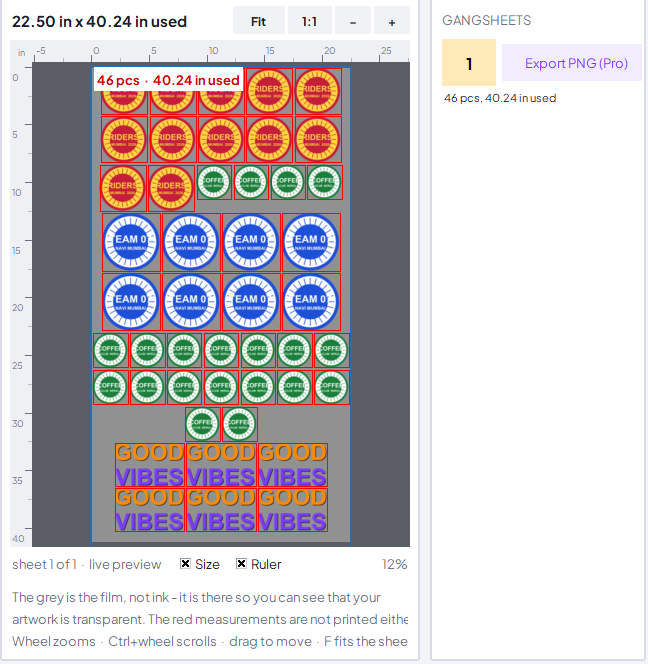
A gangsheet packed in DTF Powerhouse

Ask for a trial

Leave your shop name, WhatsApp number and email. We look at every request ourselves and get back to you on WhatsApp.

A trial, when we give one, runs on one PC for 7 days and ends by itself; nothing is charged. Windows 10 or 11, or a Mac with Apple silicon.

What Delta does for a print shop

Everything between the client's WhatsApp message and the printed film, in one window. Real screens from the program.

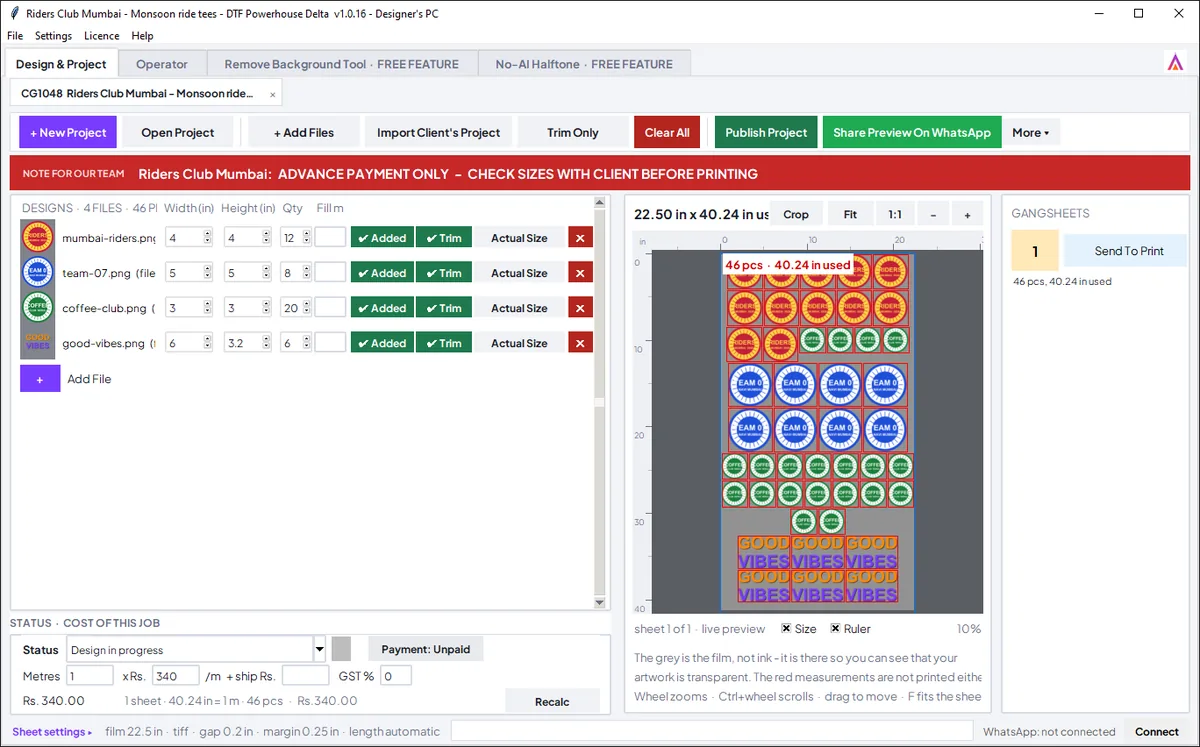
The Design and Project desk of DTF Powerhouse Delta: the designs on the left, the packed gangsheet on the right
Design & Project desk

Gangsheets that pack themselves

  • Add the designs, set sizes and quantities - the sheet packs itself on 22.5 inch film. Less film, more prints. Set the gap between images once.
  • Import a PDF, a ZIP or a whole folder: every picture inside a PDF becomes its own design, a repeated one comes once with its count. Or drop the file on the window.
  • Light/Dark and Rotate on every row: make one design lighter or darker, turn it a quarter turn, undo - the file itself is never changed.
  • Tick several rows and trim, add, set the width or quantity for all of them at once.
  • Opens the project files your clients make in the free DTF Powerhouse, exactly as they laid them out.
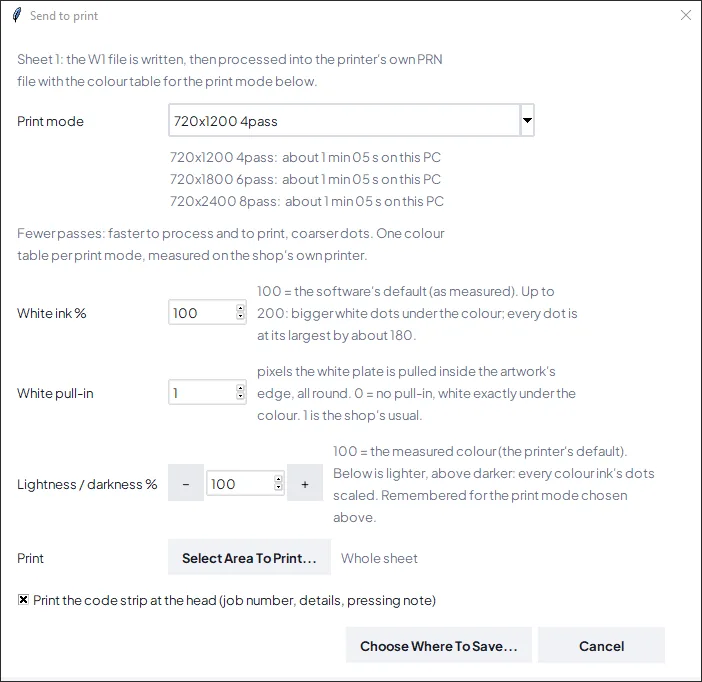
Send To Print in DTF Powerhouse Delta: print mode, white ink and the ready time
Operator desk

Print files for your printer

  • Send To Print makes the print file with the white layer under the colour in place: 4, 6 or 8 pass, white ink percent, white pull-in, lighter or darker.
  • Process All: one click sends every sheet of a job, the print mode asked once, the sheets processed one after the other while you keep working. Or tick the sheets to send.
  • Crop prints only a part of a sheet - a row that came out wrong, ten more of one design.
  • A sent sheet stays green with its story - when, on which PC - every time the job is opened again.
  • Yinstar 24 in (4 and 2 heads), Yinstar 12 in, XARC 12 in, XP600 12 in today. Tell us your printer and we confirm.
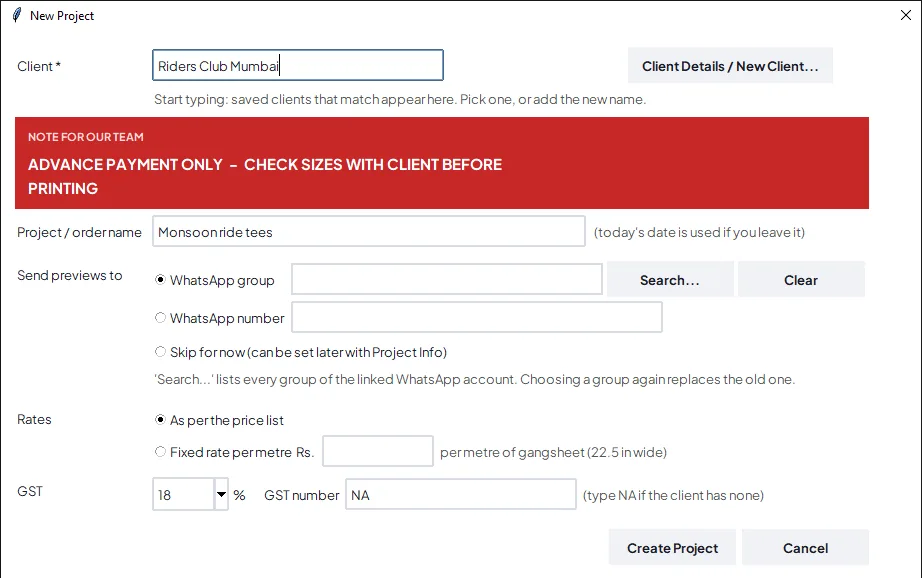
A new job in DTF Powerhouse Delta: the client, the WhatsApp group and the job number
Clients & WhatsApp

Every client, every job, every message

  • Client book with rates, notes for your team in a red box, job numbers, status from designing to printed to packed to delivered. Search by name, company, number or WhatsApp group.
  • WhatsApp from the program, from the shop's own number: the preview for approval (the client replies 1), reminders, payment details, status updates.
  • Tracking page for the client: when the operator sends the first sheet to print, Delta asks when the job will be ready; the client's group gets the link, and once the job is packed the page says "It's ready already!".
  • Scan the code strip printed at the head of the sheet: once when printed, the job is packed; again at pickup, it takes the payment and who collected.
  • Clients > Orders: every order of a client with the actions on each - status, payment, invoice, proforma, shipping, reminder.
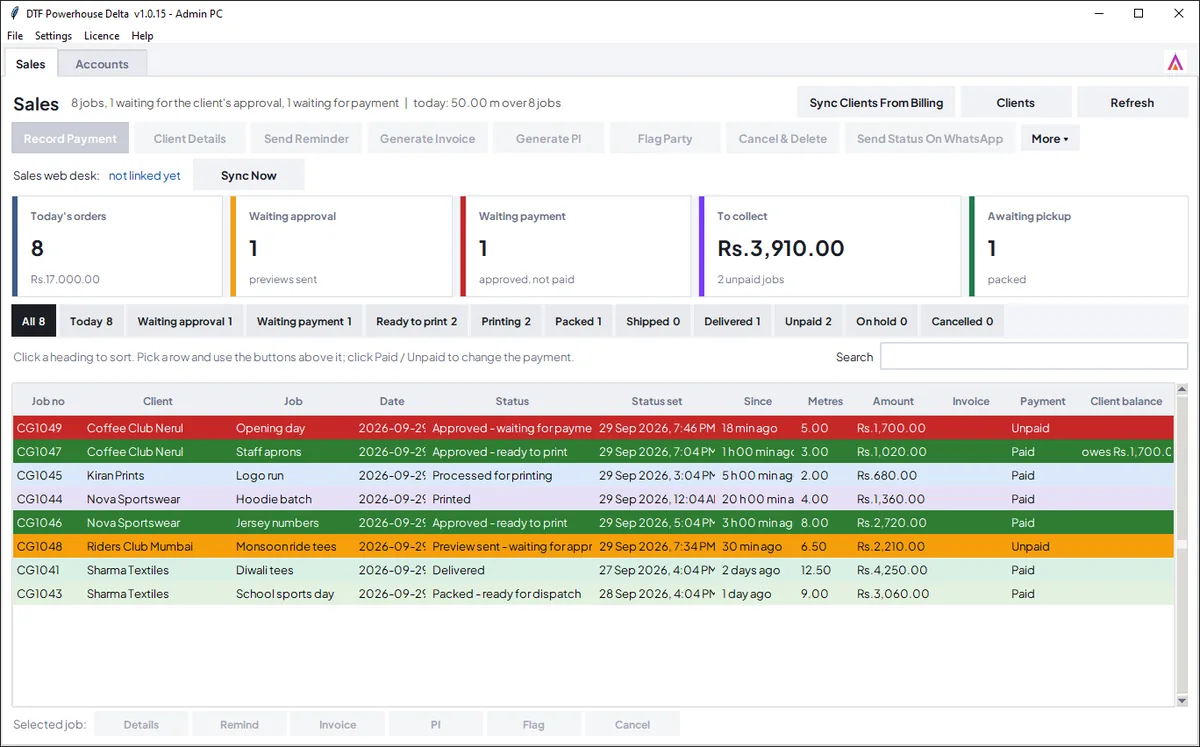
The Sales desk of DTF Powerhouse Delta: the day in tiles, a tab for every stage
Sales & Accounts

What was printed, for whom, what is due

  • Sales desk: the day in tiles, a tab for every stage, payments per job. Tick several jobs and set one status for all.
  • Accounts: what was printed, at what rate, what is paid and what is due - and in the browser at dtgdtf.com/accounts with a code to the shop's email, no password.
  • Consumption in numbers: the operator records rolls, powder, each ink and cleaning solution; with your consumable prices the Accounts tab costs every job.
  • Reports and Excel export: business by client, metres printed, ink and powder.
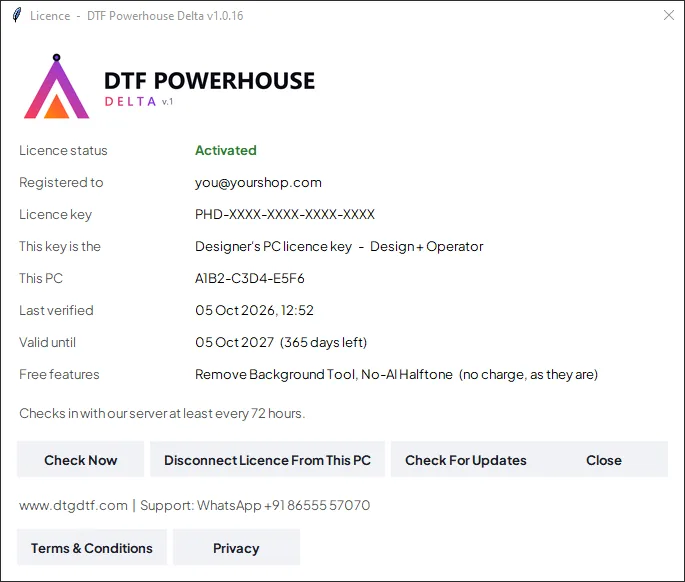
The Licence window of DTF Powerhouse Delta: which seat this PC is and until when it is valid
The whole shop

One licence, four PCs, Windows or Mac

  • One key for the shop: one Operator PC, two Designer PCs and one Admin PC, all on the same jobs, clients and accounts. Each PC takes its seat when it activates; a seat moves to another PC in one click.
  • Designer and Admin PCs can be Macs (Apple silicon). The Mac program updates itself from the menu, like Windows.
  • Publish To Server (add-on): the designer publishes a job from anywhere, the operator opens it on any PC of the shop. Two units of one business link their licences and print each other's jobs.
  • Free Up Space clears finished jobs' artwork from a PC; the records, accounts and tracking pages stay. Change Licence moves a PC to another key in one go.
  • Updates arrive in the program. Guides with pictures for the designer and the operator.
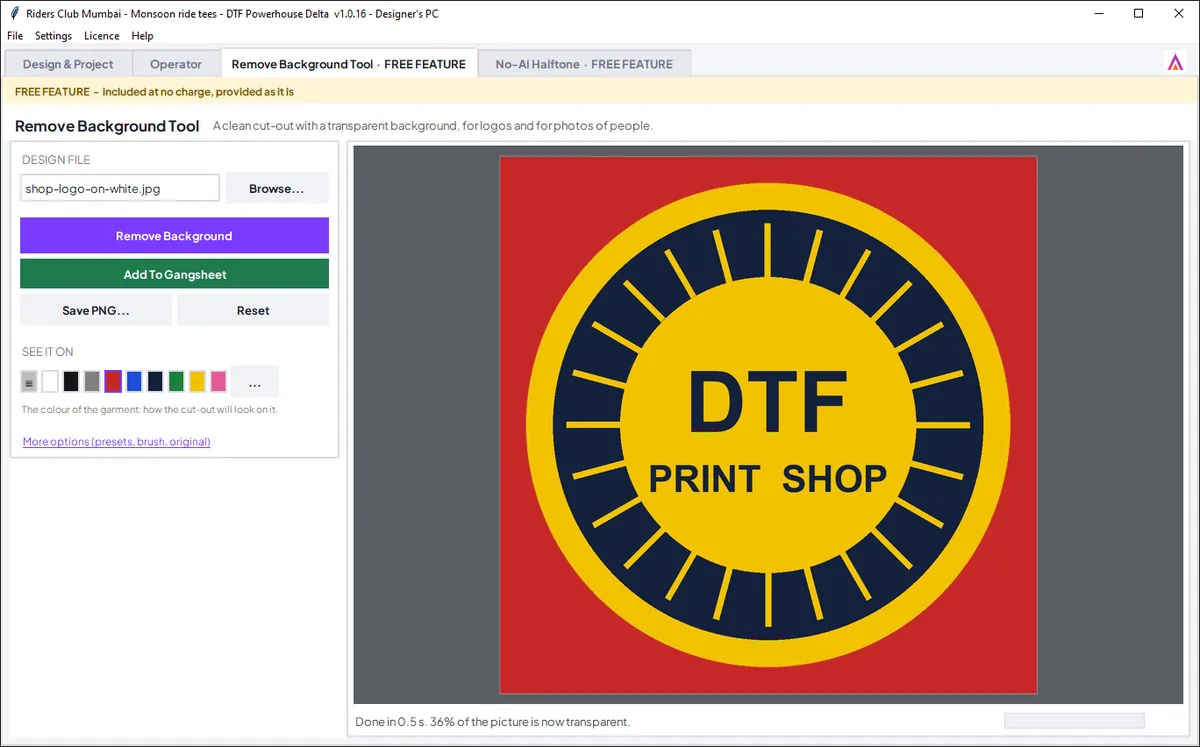
The Remove Background Tool inside DTF Powerhouse Delta
Free features

The tools, included

  • Remove Background Tool: a design or logo cut out by its colour, a photo cut out in photo mode, then Add To Gangsheet.
  • No-AI Halftone: a halftone screen for the film, with Add To Gangsheet.
  • Every tool we add comes to Delta as a free feature.
Windows & MacWindows 10 or 11 on every PC; the Designer and Admin PCs can be Apple-silicon Macs.
Your artwork stays with youDesigns, gangsheets and print files stay on your PCs. Only the shop's client book, jobs, sales and accounts live on our server so your PCs share them.
Set up with youThe first installation includes the set-up on your PCs, your printer profiles and training.
Support on WhatsApp+91 86555 57070 - message, not call. Updates and every new tool are in the yearly fee.

The price

One licence key for the whole shop: up to four PCs - one Operator, two Designers, one Admin - on the same jobs, clients and accounts. Windows; the Designer and Admin PCs can be Macs.

First installation
₹45,000
set-up on your PCs, your printer profiles, training, and the first year
Every year after
₹4,999/year
updates, every new tool, support on WhatsApp

Buy on WhatsApp Ask for a trial

Prices include taxes. A trial key becomes your licence when you buy - nothing to reinstall.

Your clients get the free version

DTF Powerhouse (free) lets your clients lay out their own gangsheets and send you the project file, which opens in your Delta exactly as they made it.

See the free version